Guides / Guide
M365 JML automation: two linked flows, not one, and why that's the whole design
Background
Every organisation I've worked in had a JML process on paper. Almost none of them had one a leaver's manager couldn't quietly bypass. The gap is never the joiner side - a new starter with no access complains loudly on day one. The leak is always leavers: someone moves department, or leaves entirely, and their access follows them anyway because it was never tied to anything that updates itself.
The build that actually holds up is two flows, linked by a database and nothing else:
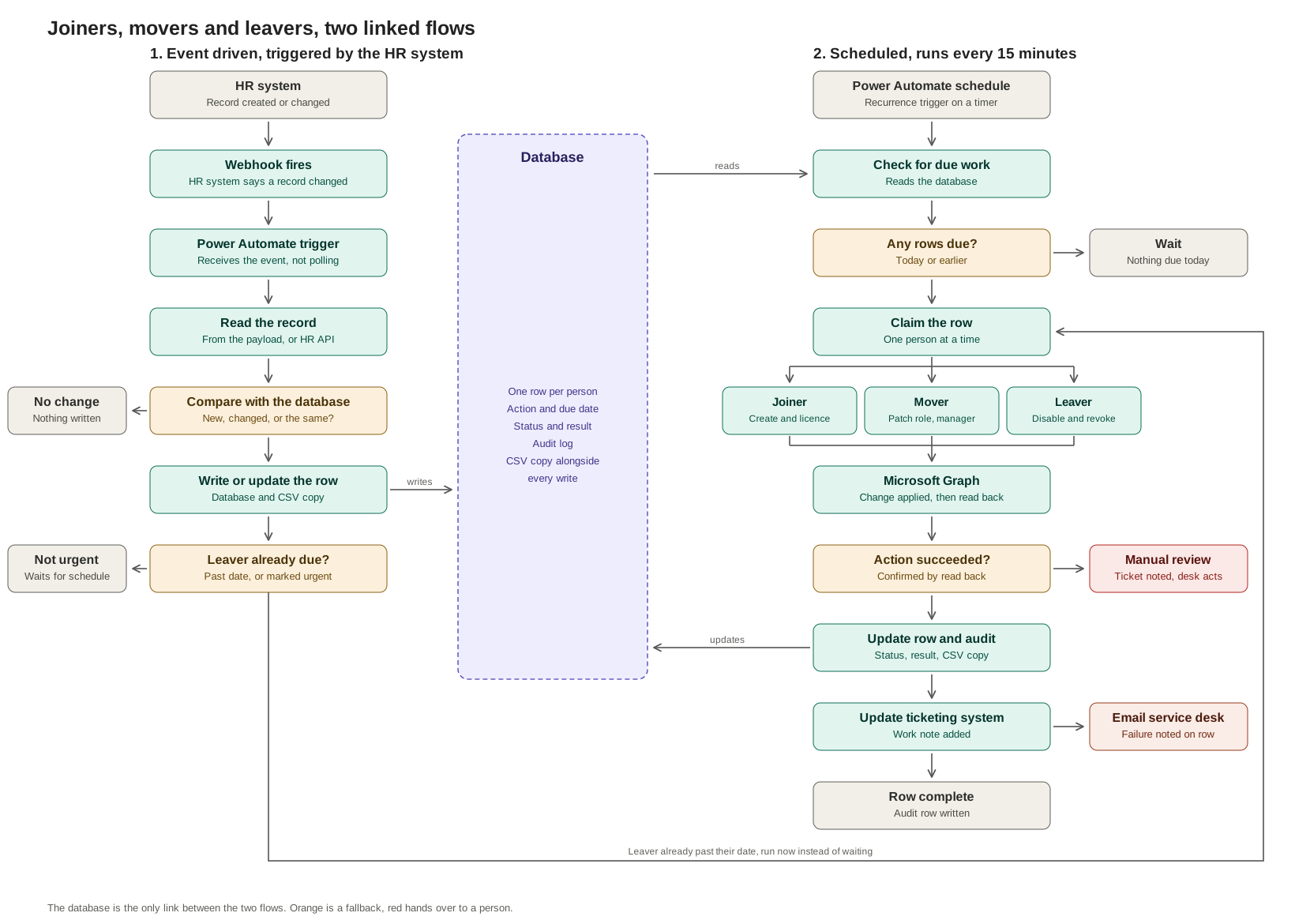
Flow 1, event driven. The HR system fires a webhook when a record changes. Power Automate receives it, reads the record, compares it with what's already stored, and writes a row if something actually changed. It makes no identity changes at all - it only knows something happened.
Flow 2, scheduled. Every 15 minutes, Power Automate reads the database for rows that are due, claims one at a time, calls Microsoft Graph, then writes the result to an audit log and the ticket.
Neither flow calls the other. The database is the only thing connecting them, which means either one can fail on its own without taking the other down with it.
Why split it at all. A webhook gives you no control over timing. A leaver notified three weeks in advance must not be disabled today, and a joiner notified at midnight shouldn't sit waiting for someone to notice in the morning. Storing the intent and acting on a schedule separates knowing from doing - the same reason dynamic groups beat a manually maintained access list: a rule that recalculates itself doesn't depend on someone remembering to update it.
Setup
Own the flows with a service account, never a person. People leave - sometimes as part of the exact JML process the flow implements - and a flow owned by someone who's just been offboarded is a memorable way to discover the gap.
Split the app registrations, so the leaver automation literally cannot create users. Two Entra ID app registrations, not one with every permission bundled together:
- Joiner/mover app -
User.ReadWrite.All,LicenseAssignment.ReadWrite.All,Organization.Read.All,GroupMember.Read.All. - Leaver app -
User.Read.All,User.EnableDisableAccount.All,User.RevokeSessions.All,LicenseAssignment.ReadWrite.All,AuditLog.Read.All. Least-privilege isn't just good practice here - it's a hard guarantee that a bug in the leaver flow can't accidentally create an account, because the credential it's running as has no permission to.
Both are application permissions needing admin consent. Both secrets live in Key Vault, referenced from the flows, never pasted inline into an action.
The database has three tables, and the one that matters most is the
claim procedure. A staging table holds pending work with a unique index
on employee/action/date, which is what makes writing the same HR record
five times produce one row rather than five. An audit table is
insert-only - the flow's SQL identity gets INSERT and nothing else,
because an audit log you can edit isn't an audit log. And the claim
procedure does this in one atomic statement:
CREATE PROCEDURE dbo.usp_ClaimJmlRequest @RequestId INT
AS
BEGIN
    SET NOCOUNT ON;
    UPDATE dbo.JmlRequest
    SET Status = 'processing',
        LockedUTC = SYSUTCDATETIME(),
        AttemptCount = AttemptCount + 1
    OUTPUT inserted.RequestId, inserted.EmployeeId, inserted.Upn,
           inserted.Action, inserted.CorrelationId, inserted.TicketId
    WHERE RequestId = @RequestId AND Status = 'pending';
END
Zero rows back means something changed since the select - a rescind arrived, or another run already got there first - and the row gets skipped, not actioned twice. This one procedure is what stops a leaver being disabled twice, or a joiner ending up with two accounts, when the schedule overlaps a slow-running previous cycle.
The Graph calls, per action, in the order that actually matters:
- Joiner - check for a collision first (
GET /users/{upn}, a 200 means stop and alert, not overwrite). Department, job title and company all go in the create call itself, not patched afterwards - patching them later leaves the starter sitting in zero groups for a window, because dynamic group evaluation is asynchronous and can take minutes. - Mover - snapshot group membership before the change, patch the attributes, snapshot again after. Dynamic groups remove themselves once the rule stops matching; manually assigned ones don't. Flag the difference for a person to review - don't auto-remove a manually granted group, or you'll cut off access someone still legitimately needs.
- Leaver - read elevated role assignments before disabling the account, because they're harder to enumerate cleanly once it's gone. Then disable, revoke sign-in sessions, and remove licences - in that order, so a session token doesn't outlive the disable by even a few seconds.
Read back after every write. A 200 on the call is not proof the change landed. Re-GET the user and confirm before marking the row complete.
Edge Cases & BCP
- The rescind tests are the ones almost every build skips, and almost every build fails. A leaver rescinded before their date should cancel cleanly with nothing actioned. A leaver rescinded during a run, mid-way through processing, should have the claim fail and the person skipped - not half-disabled. If you haven't tested a rescind arriving mid-run on purpose, you don't actually know which of those two happens.
- Cancel by status, never by deleting the row. Deleting a rescinded leaver destroys the only record that a leaver was ever raised in the first place - the first thing an auditor asks about when this comes up.
- Back up before the database write, not after. If intake writes a raw copy of the payload to blob storage before touching the database, an outage during the write still leaves something to replay from. Back up after, and the one time you actually need it is the one time the database was already down when you tried.
- A database outage during processing pauses; it does not fail over to the backup copy. The claim procedure is the only thing stopping the same person being actioned twice, and a CSV or blob has no equivalent atomic claim. For a leaver, processing from the backup risks a harmless double-disable. For a joiner, it risks two live accounts nobody knows about. Losing an event is unrecoverable, so intake gets a fallback. Delaying an action is recoverable, so processing just waits.
- Decide licence removal timing on purpose, not by default. Stripping an Exchange licence starts a 30-day clock on the mailbox. If your retention policy needs longer than that, that's a second, later-dated row in the same table - not a special case bolted onto the leaver flow.
- What happens if the automation itself fails silently is the question almost nobody asks until it's already happened. A flow that quietly stops triggering looks identical to "nobody left this month" until you go and check. Monitor the schedule running, not just the outcomes it produces when it does.
- A standby you never exercise is decorative. If there's a manual fallback process for when the automation's down, run it deliberately against a test record on a schedule - monthly is enough - or accept that it won't actually work the one time you need it.